
The digital transformation of higher education has made the student portal the central hub for academic life. Understanding how to navigate the post university student portal login process efficiently is essential for students pursuing advanced degrees, whether they're enrolled in MBA programs, PhD research, or professional diplomas. This comprehensive guide examines every aspect of portal authentication, security protocols, troubleshooting common issues, and maximizing the value of your portal access throughout your academic journey.
Understanding Student Portal Architecture
Modern university portals function as integrated platforms that connect multiple systems into one unified interface. The post university student portal login serves as the gateway to course materials, grade tracking, financial information, library resources, and communication tools. These portals have evolved significantly from simple information repositories to sophisticated platforms that support every stage of the student lifecycle.
Core Portal Components
Behind every successful login lies a complex infrastructure designed to authenticate users and deliver personalized content. The authentication layer verifies identity through credentials, the authorization layer determines what resources each user can access, and the presentation layer adapts the interface to individual needs and preferences.
Most institutions now implement single sign-on (SSO) capabilities, allowing students to access multiple university systems with one set of credentials. This approach, supported by frameworks like InCommon Federation, reduces password fatigue while maintaining security across interconnected educational platforms.

Portal Integration Ecosystem
Student portals integrate with numerous backend systems including learning management systems (LMS), student information systems (SIS), library databases, and financial platforms. Each integration requires careful coordination to maintain data consistency and security. When you complete your post university student portal login, the system queries multiple databases simultaneously to populate your personalized dashboard with real-time information.
| System Type | Primary Function | Data Accessed |
|---|---|---|
| SIS | Academic records | Grades, transcripts, enrollment |
| LMS | Course delivery | Assignments, discussions, content |
| Library | Research resources | Journals, databases, citations |
| Financial | Billing & aid | Tuition, payments, scholarships |
The sophistication of these integrations directly impacts user experience. Well-designed portals present a seamless interface despite drawing from dozens of separate data sources, while poorly integrated systems force students to navigate disjointed experiences and repeated logins.
Securing Your Portal Access
Security remains paramount when handling sensitive academic and personal information. The post university student portal login process incorporates multiple layers of protection to safeguard student data and comply with regulations such as FERPA, which governs educational record privacy. According to federal student privacy guidance, institutions must implement appropriate technical safeguards for electronic student records.
Multi-Factor Authentication Implementation
Multi-factor authentication (MFA) has become standard practice across higher education. Research from Internet2’s 2023 MFA community survey shows that over 85% of research and education institutions have deployed MFA campus-wide. This authentication method requires something you know (password), something you have (phone or token), and sometimes something you are (biometric data).
Common MFA methods for student portals include:
- SMS or email verification codes
- Authenticator app time-based codes (TOTP)
- Push notifications to registered devices
- Hardware security keys
- Biometric verification (fingerprint, facial recognition)
The Okta Secure Sign-in Trends Report 2024 reveals that phishing-resistant authentication methods are gaining traction, with educational institutions increasingly adopting hardware keys and biometric options for high-risk accounts such as administrators and researchers.
Password Best Practices
Despite MFA adoption, strong passwords remain the first line of defense. When setting up your post university student portal login credentials, follow these guidelines:
- Create passwords with at least 16 characters combining uppercase, lowercase, numbers, and symbols
- Avoid personal information such as birthdates, names, or common dictionary words
- Use unique passwords for each account rather than recycling credentials
- Employ a password manager to generate and store complex passwords securely
- Enable password change notifications to detect unauthorized access attempts
Many portals now enforce password complexity requirements and periodic rotation policies. While frequent password changes can reduce security if users choose predictable patterns, strategic rotation after potential exposure events remains valuable.
Navigating the Login Process
The actual mechanics of completing your post university student portal login vary by institution, but most follow similar patterns designed to balance security with usability. Understanding these patterns helps students access resources quickly while avoiding common pitfalls.
Initial Account Activation
New students typically receive provisional credentials via email or postal mail before their first semester. The activation process usually requires:
- Verifying your identity with personal information (student ID, date of birth, last four digits of SSN)
- Creating a secure password meeting institutional requirements
- Setting up security questions for account recovery
- Configuring MFA devices and backup methods
- Accepting terms of service and data usage policies
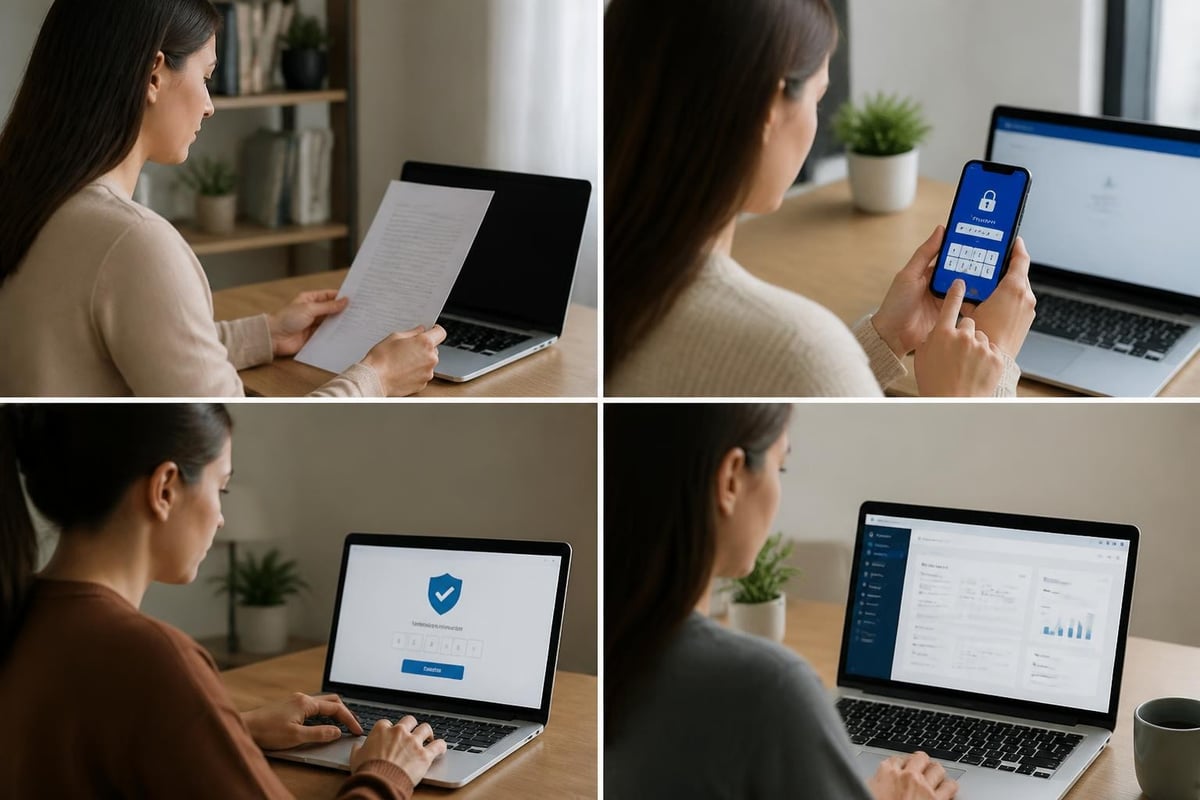
This initial setup establishes your digital identity within the university ecosystem. Research from the University of Gold Coast demonstrates that comprehensive onboarding processes reduce support tickets by up to 40% by addressing common questions proactively.
Standard Login Procedure
Once activated, the typical post university student portal login follows this sequence:
- Navigate to the official portal URL (bookmark this address or use official university links)
- Enter your username or student email address
- Input your password
- Complete MFA verification when prompted
- Review any system announcements or policy updates
- Access your personalized dashboard
Always verify you're on the legitimate portal site by checking the URL and SSL certificate (look for the padlock icon in your browser). Phishing attempts often create convincing fake login pages to steal credentials.
Mobile Access Considerations
Mobile devices have become primary access points for many students. Portal developers optimize mobile experiences through responsive design or dedicated applications. When using mobile for your post university student portal login, ensure:
- You're connected to secure Wi-Fi or cellular data (avoid public, unencrypted networks)
- Your device has current security updates and antivirus protection
- You enable biometric authentication where available for convenience and security
- You log out after each session on shared or public devices
- You configure automatic session timeouts for added protection
Troubleshooting Common Login Issues
Even well-designed systems encounter problems. Understanding how to diagnose and resolve common post university student portal login issues saves time and frustration.
Password and Credential Problems
Forgotten passwords top the list of support requests. Most portals offer self-service password reset through:
- Security questions you configured during activation
- Email verification to your registered address
- SMS codes to your verified phone number
- Identity verification through personal information
If self-service methods fail, contact your IT help desk with:
- Your student ID number
- Full legal name as registered
- Alternative contact information
- Recent account activity details
Account lockouts typically occur after multiple failed login attempts, a security measure to prevent brute-force attacks. Most systems implement progressive lockouts: 15 minutes after three failures, 30 minutes after five, and full suspension requiring administrative intervention after repeated violations.
Technical and Browser Issues
Browser compatibility affects portal functionality. Clear your browser cache and cookies if you experience:
- Login loops that return you to the login page despite correct credentials
- Partial page loading or missing features
- Error messages about expired sessions
- Inability to submit forms or navigate between pages
| Browser | Recommended Version | Common Issues |
|---|---|---|
| Chrome | Latest stable | Rare; best compatibility |
| Firefox | Latest stable | Cookie handling requires adjustment |
| Safari | Latest stable | Third-party cookie blocking affects SSO |
| Edge | Latest stable | Legacy compatibility mode causes problems |
Disable browser extensions temporarily to isolate conflicts. Ad blockers, privacy tools, and script managers sometimes interfere with authentication mechanisms. The Nielsen Norman Group’s university usability research emphasizes that institutions should design portals to function across diverse technical environments rather than requiring specific configurations.
Network and Connectivity Challenges
VPN usage can complicate the post university student portal login process when geographic restrictions or IP whitelisting apply. Students accessing portals from international locations may encounter:
- Blocked access from certain countries due to security policies
- Slower response times from geographically distant servers
- Licensing restrictions preventing access to library databases
- Certificate errors from network filtering in restrictive regions
Contact your institution's international student services or IT support for approved VPN solutions that maintain security while enabling global access.
Maximizing Portal Value
Successfully logging in represents only the beginning. Strategic portal use enhances academic success and streamlines administrative tasks throughout your degree program.
Dashboard Customization
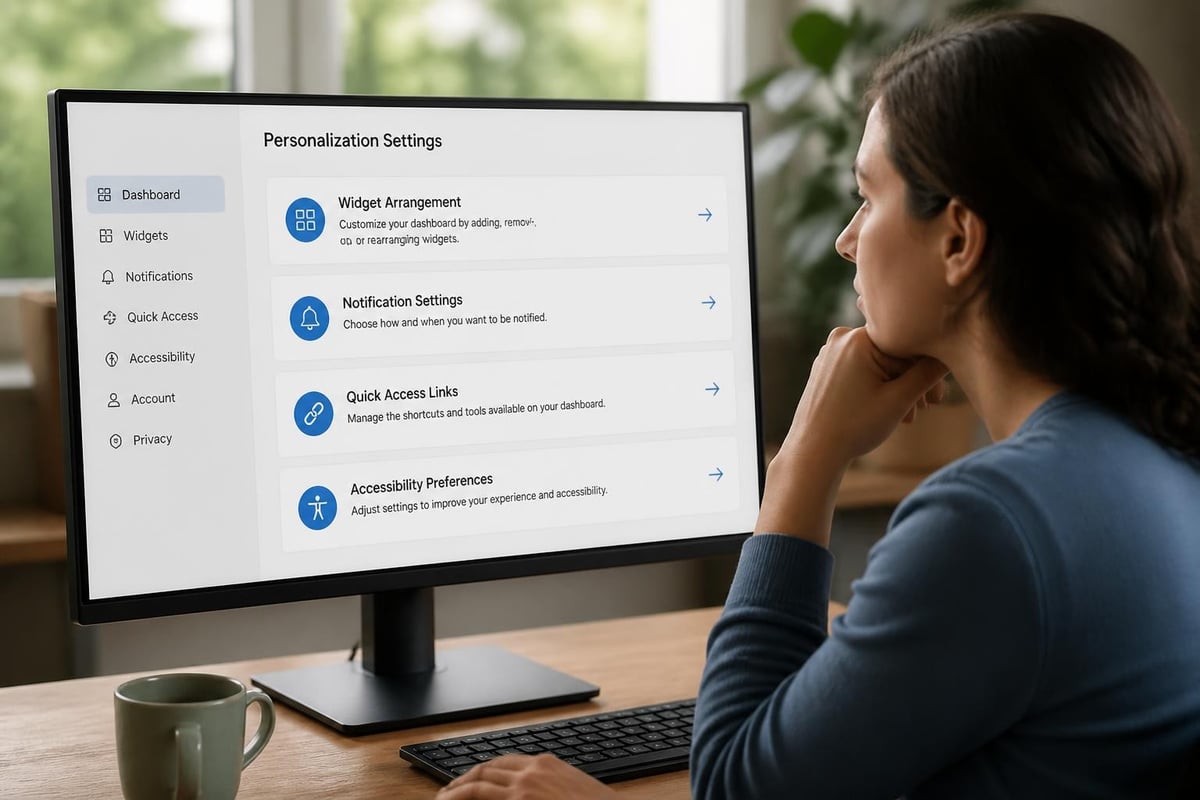
Most portals allow personalization to surface your most-used features. Common customization options include:
- Widget arrangement and visibility settings
- Notification preferences for grades, announcements, and deadlines
- Quick links to frequently accessed courses or resources
- Calendar integration with personal scheduling tools
- Theme and display preferences for accessibility
Students pursuing advanced degrees at institutions like the University of Gold Coast benefit from tailoring their portal experience to their specific program requirements, whether they're managing MBA coursework, PhD research milestones, or professional diploma certifications.
Resource Discovery and Navigation
Effective portal navigation requires understanding the organizational logic. Most portals structure content around key student needs:
- Academic tab: Courses, grades, transcripts, degree audit, registration
- Financial tab: Tuition, payments, financial aid, billing history
- Services tab: Advising, career counseling, health services, disability support
- Resources tab: Library, research tools, IT support, learning support
- Personal tab: Profile, settings, communication preferences, emergency contacts
Use portal search functions to locate specific forms, policies, or resources quickly. Advanced search filters by category, date, or relevance help refine results in large institutional portals.
Integration with External Tools
Modern portals often connect to external platforms students use regularly. Integration capabilities may include:
- Calendar synchronization with Google Calendar, Outlook, or Apple Calendar
- Email forwarding to preferred external addresses
- Cloud storage linking to Google Drive, OneDrive, or Dropbox
- Productivity tools such as Grammarly, citation managers, or note-taking apps
- Career platforms like LinkedIn Learning, Handshake, or industry-specific job boards
Check your portal's integration directory and enable connections that support your workflow. These integrations eliminate redundant data entry and create a more cohesive digital study environment.
Privacy and Data Management
Understanding how institutions collect, use, and protect your data empowers informed decisions about privacy settings and information sharing. A recent peer-reviewed study from Tufts University examined how students interact with FERPA privacy settings and found significant gaps between student privacy preferences and actual institutional practices.
Directory Information Controls
FERPA distinguishes between protected educational records and directory information that institutions may disclose without consent. Directory information typically includes:
- Name, address, telephone number, email address
- Date and place of birth
- Dates of attendance and enrollment status
- Academic program and degree sought
- Participation in officially recognized activities
- Degrees, honors, and awards received
After completing your post university student portal login, navigate to privacy settings to review and restrict directory information disclosure if desired. Note that restrictions may prevent inclusion in graduation programs, dean's lists, or athletic rosters.
Third-Party Data Sharing
Universities increasingly partner with external vendors for portal features, analytics, and student services. Review data sharing agreements in your portal settings to understand:
- Which third parties receive your data
- What data categories are shared (demographic, academic, behavioral)
- The purpose of data sharing (service delivery, analytics, research)
- Your options to opt out of non-essential sharing
- Data retention and deletion policies
Federal oversight, including examinations of Department of Education incident response, highlights the importance of robust data governance in educational technology systems.
Session Management and Activity Monitoring
After your post university student portal login, the system maintains your session through encrypted tokens that expire after a period of inactivity. Best practices for session security include:
- Log out explicitly rather than simply closing the browser, especially on shared devices
- Monitor active sessions through security settings that display login locations and devices
- Review access logs periodically to detect unauthorized access attempts
- Revoke device authorization for lost or stolen equipment
- Update contact information immediately to ensure security notifications reach you
Some portals implement adaptive authentication that flags unusual login patterns (unfamiliar locations, new devices, atypical access times) and require additional verification.
Portal Evolution and Future Trends
The post university student portal login experience continues evolving as technologies mature and student expectations rise. Understanding emerging trends helps students prepare for coming changes and advocate for improvements.
Artificial Intelligence Integration
AI-powered features increasingly appear in student portals, including:
- Chatbots providing 24/7 support for common questions about login, course registration, and deadlines
- Predictive analytics identifying students at risk of academic difficulty based on portal engagement patterns
- Personalized recommendations for courses, resources, and opportunities based on program requirements and interests
- Automated degree auditing that tracks progress toward completion in real-time
- Natural language search allowing conversational queries instead of keyword searches
These features enhance convenience but raise privacy questions about the extent of data collection and algorithmic decision-making in academic contexts.
Accessibility Enhancements
Accessibility standards such as WCAG 2.1 AA compliance are becoming baseline expectations rather than aspirational goals. Modern portals incorporate:
- Screen reader compatibility and keyboard navigation throughout
- Adjustable text sizes, contrast ratios, and color schemes
- Alternative text for images and meaningful link descriptions
- Caption support for video content and transcripts for audio
- Compatible with assistive technologies including voice control and eye tracking
These improvements benefit all users, not just those with documented disabilities, by creating more flexible and forgiving interfaces.
Cross-Institutional Portability
As students increasingly pursue credentials from multiple institutions simultaneously or transfer between programs, demand grows for portable digital identities and interoperable systems. Initiatives like distributed credentials (blockchain-based transcripts) and federated identity management aim to simplify the post university student portal login experience when engaging with multiple institutions throughout a lifetime of learning.
Mobile-First Design Strategies
With over 70% of portal sessions originating from smartphones and tablets in 2026, mobile optimization has shifted from optional enhancement to core requirement. Effective mobile portal design prioritizes task completion over comprehensive feature access.
Progressive Web Applications
Many institutions now deploy progressive web apps (PWAs) that function like native applications while running in web browsers. PWAs offer:
- Offline access to cached content such as syllabi, grades, and saved resources
- Push notifications for time-sensitive announcements and deadlines
- Home screen installation for quick access without typing URLs
- Reduced data usage through efficient caching and background synchronization
- Consistent experience across operating systems without separate development
PWAs eliminate the friction of separate app downloads while delivering native-like performance and reliability.
Touch-Optimized Interfaces
Mobile portal design accounts for touch interaction patterns distinct from mouse-driven desktop use:
- Larger tap targets (minimum 44×44 pixels) prevent accidental selections
- Thumb-friendly navigation positions key controls within easy reach
- Swipe gestures for common actions like refreshing feeds or dismissing notifications
- Simplified forms with mobile-appropriate input types (numeric keypads for student IDs, date pickers for birthdates)
- Reduced cognitive load through progressive disclosure that reveals complexity gradually
These design principles recognize the contexts in which students access portals on mobile devices-often in brief moments between activities rather than focused desk sessions.
Support Resources and Documentation
Even the most intuitive portal benefits from comprehensive documentation and responsive support channels. Successful institutions provide multiple pathways for assistance with post university student portal login challenges and general usage questions.
Self-Service Knowledge Bases
Searchable help centers reduce support burden while empowering students to resolve issues independently. Effective knowledge bases include:
- Step-by-step tutorials with screenshots for common tasks
- Video walkthroughs demonstrating navigation and features
- Frequently asked questions organized by topic
- Troubleshooting guides with decision trees
- Policy documents explaining data handling and privacy
Quality documentation anticipates user questions, uses clear language avoiding jargon, and updates regularly to reflect system changes.
Live Support Options
When self-service doesn't suffice, direct assistance becomes necessary. Support channels typically include:
- Help desk phone lines with extended hours during peak periods (registration, finals)
- Email support for non-urgent questions with documented response time commitments
- Live chat providing real-time assistance for login and navigation issues
- In-person support at campus IT centers for complex technical problems
- Video conferencing for screen sharing and guided troubleshooting
The most effective support strategies triage requests by urgency and complexity, routing simple password resets through automated systems while connecting critical access issues to live agents immediately.
Mastering the post university student portal login process unlocks the full potential of your academic institution's digital resources, from course materials to research databases to administrative services. By implementing strong security practices, understanding troubleshooting techniques, and strategically customizing your portal experience, you can streamline every aspect of your educational journey. The University of Gold Coast provides comprehensive portal support alongside rigorous academic programs in business, law, theology, and professional development, ensuring that students pursuing PhD, MBA, MSc, LLM, and diploma credentials can focus on learning rather than technical obstacles.